Newgrounds Integration — Medals & Scoreboards
- What Newgrounds integration does and when to use it
- Set up a Newgrounds app and get your API credentials
- Configure medals and scoreboards in Game Settings
- Trigger medal awards from events
- Submit player scores to a Newgrounds scoreboard
- Test medal calls in local development
- Design a multi-medal achievement system
What Is Newgrounds Integration?
Newgrounds.com is a long-running independent game portal with its own platform API called Newgrounds.io. If you publish your escape game on Newgrounds, you can unlock two powerful features:
- Medals — In-game achievements awarded to players for completing specific challenges. Medals are tied to a player's Newgrounds account and persist across sessions.
- Scoreboards — Leaderboards where player scores (or completion times) are submitted and ranked globally.
EscapeMaker has a built-in Newgrounds manager that handles all API calls. You don't write any API code — you configure credentials in Game Settings and assign medal/score actions in events, and EscapeMaker does the rest.
Prerequisites
Before configuring Newgrounds integration in EscapeMaker, you need three things:
- A Newgrounds.com account — create one free at newgrounds.com if you don't have one.
- A Newgrounds.io API app — go to the Newgrounds.io API portal, sign in, and create a new app entry for your game. This generates your App ID.
- At least one medal or scoreboard defined inside your Newgrounds app settings — you configure these on the Newgrounds.io dashboard, not inside EscapeMaker. Each medal gets a numeric ID assigned by Newgrounds.
Have your App ID (format: 12345:AbcDefGhi) and your medal IDs ready before proceeding to the next step.
Configuring in Game Settings
Open the Game Settings Panel → Newgrounds section. Fill in the following fields:
- App ID — Paste your Newgrounds.io API App ID in full (e.g.,
12345:AbcDefGhi). - Enable Medals — Toggle ON to allow medal award calls from events.
- Enable Scoreboard — Toggle ON to allow score submission calls from events.
- Scoreboard ID — The numeric ID of the Newgrounds scoreboard you want to submit to. This ID is shown in your Newgrounds.io app dashboard next to the scoreboard entry.
These settings only affect exported games hosted on Newgrounds. They have no effect when testing locally in the EscapeMaker editor preview.
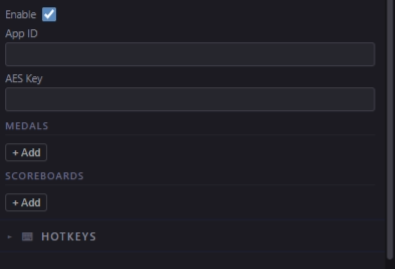
Newgrounds config in Game Settings — paste your App ID and define medal entries.
Defining Medals
Still in Game Settings → Newgrounds → Medals, click "Add Medal". Fill in the fields for each medal:
- Medal ID — The numeric ID assigned to this medal by Newgrounds (visible in your Newgrounds.io app dashboard). This value must match exactly — if it is wrong, the award call will silently fail.
- Name — A display name used to identify this medal inside the EscapeMaker editor (e.g., "Escaped!", "Speed Runner", "Found Everything"). Players see the name from the Newgrounds dashboard, not from here.
- Description — An optional note for your own reference (e.g., "Awarded when Win Game fires").
Add one entry for each medal you defined on Newgrounds. You can add all of them now even if you haven't wired up their events yet.
Awarding a Medal via Event
Medals are awarded from inside any event's action list. To award a medal when a player wins the game:
- Open the Global Events panel (or any event where you want the medal to fire)
- Add a new event (or open the existing Win Game event)
- Trigger: Win Game (the global win trigger)
- Add action: "Award Newgrounds Medal" → choose the medal from the dropdown (shows the names you defined in Step 4)
When the "Win Game" action fires anywhere in the game, this event triggers, and EscapeMaker calls the Newgrounds.io medal award API for the logged-in Newgrounds user. The medal is awarded immediately and appears in the player's Newgrounds profile.
You can add the "Award Newgrounds Medal" action to any event trigger — it does not have to be Win Game. Award medals for solving specific puzzles, finding hidden objects, or reaching secret scenes.
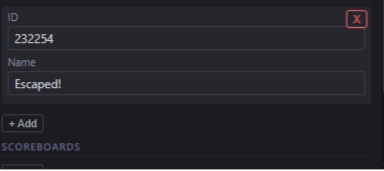
Award medals and submit scores from any event — typically triggered on game win.
Submitting a Score
To submit the player's score to a Newgrounds scoreboard, use the action "Submit Newgrounds Score" in any event. Fields:
- Scoreboard ID — Auto-filled from Game Settings, but can be overridden per-action if you have multiple scoreboards.
- Score Value — Choose one of three sources:
- Fixed number — Always submit the same value (e.g., 1 point for completion)
- Game timer value — Submit the elapsed or remaining time in seconds. Ideal for a "fastest escape" leaderboard.
- Custom state variable — Submit the value of any Number state variable. Use this if you track a point total, collectible count, or penalty score during the game.
A typical setup: in the Win Game event, add both "Award Newgrounds Medal" and "Submit Newgrounds Score" with the timer value. This simultaneously awards the completion medal and records the player's time on the leaderboard.
Testing Medals
Newgrounds medal and score calls only fire properly when the game is either:
- Hosted on Newgrounds.com (after you've submitted your exported game), or
- Running inside the Newgrounds.io test harness (a local testing tool provided by Newgrounds for developers)
When you test in the EscapeMaker editor preview or load the exported HTML locally, medal calls will log to the browser console but will not actually award medals or submit scores. To inspect the calls:
- Open the browser developer tools (F12)
- Navigate to the Console tab
- Trigger the event that should award a medal
- Look for a log entry from EscapeMaker confirming the medal call was attempted with the correct medal ID
If the log entry appears with the right ID, the wiring is correct and will work on Newgrounds.
Multiple Medals for Different Achievements
A single completion medal is fine, but a well-designed medal system gives players reasons to replay your game. Beyond the basic win medal, consider adding medals for:
- All collectibles found — Condition: collectible state variable equals the maximum count. Award during the Win Game event if the condition is met.
- Hidden bonus puzzle solved — A secret room or optional puzzle that most players won't find. Condition: a Boolean state variable
bonus_solvedequals true. - Speed run — Complete the game in under 10 minutes. Condition: timer value is less than 600 seconds at the time the Win Game action fires.
- No hints used — Track hint clicks via a state variable. Award the medal if the counter is still 0 at win time.
Use conditions on your medal-awarding events to gate them appropriately. All medal award actions can live in the same Win Game event — just add conditions to each one.
You've completed the Expert track!
You now know everything EscapeMaker has to offer. Go build something amazing.
Back to All Tutorials